
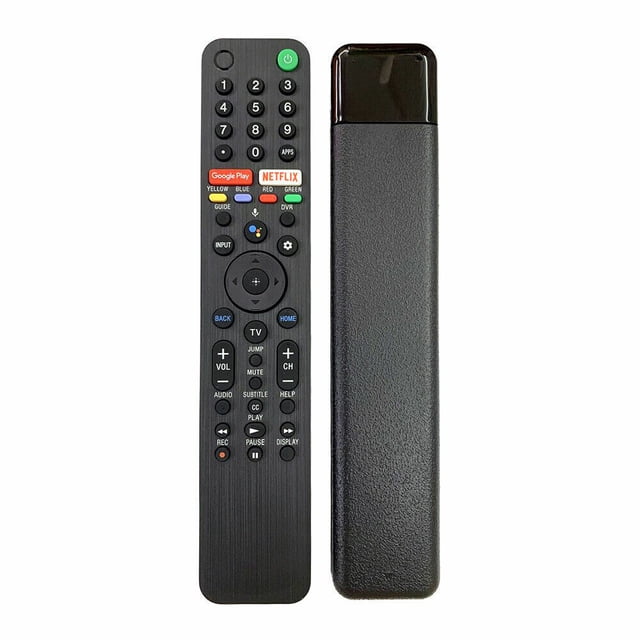
New RMF-TX500U for Sony Smart TV 4K voice remote control XBR-55X950G RMF-TX500P, designed for seamless TV operation. Features include a black finish, volume and channel controls, and dedicated Netflix and Google Play buttons. Ideal for replacing lost or damaged remotes.
Flash Deal
Overall pick
for "sony tv remote"
|2

New RMF-TX500U For Sony Smart TV 4K Voice Remote Control XBR-55X950G RMF-TX500P

About this item

  • Step 1: Identify the Make and Model of Your TV: Before replacing your TV remote, it's essential to know the make and model of your television. This information is usually located on a label on the back or side of your TV. Make a note of it, as you'll need it when purchasing a replacement remote.
  • Step 2: Purchase a Replacement Remote: Once you have the make and model of your TV, you can purchase a replacement remote. You can buy one from an electronics store, online retailer, or directly from the TV manufacturer. Make sure the replacement remote is compatible with your specific TV model.
  • Step 3: Insert Batteries: Most TV remotes are powered by batteries. Open the battery compartment on the back of the new remote and insert the required batteries, following the polarity indicated in the compartment.

At a glance

Compatible Devices
Sony Smart TV
Compatible Brands
Sony
Power Type
Battery
Brand
Supershield
Compatible Models
RMF-TX500U Sony TV Remote
Model
RMF-TX500U

Shop Confidently

A to Z campus finds at low prices
ShopShop
Current price is Now $13.89
You save $3.11
was $17.00
Price when purchased online
Seller delivery for $6.99, arrives by Wed, Sep 23 to
Sold and shipped by Toronto phone accessories IncPro Seller
Return policy
